
CI/CD
Execution API
RakAPIt provides test cases/scenario execution API. User can use the API to run test cases or test case scenario. The information required for the execution API is as follows.
-
Test Cases Execution
REQUEST
- Method: POST
- Endpoint: https://rakapit-run-api.dockyard.biz
-
Header:
- Content-Type: application/json
-
Authorization: [Access Token]
※ Please check the Access Token in the "CI/CD Setting - Access Token" column of "My profile".
-
Body:
-
projectId: string
※ ProjectId is obtained like this
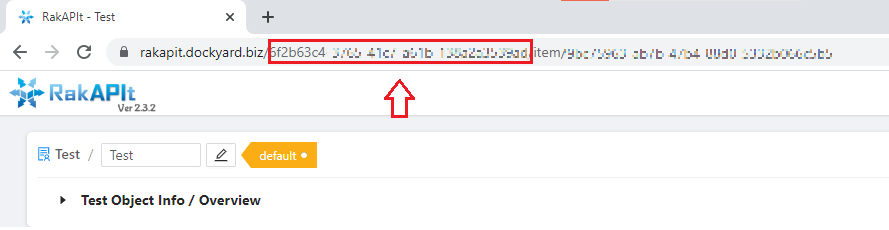
Get ProjectId -
testObjectId: string
※ TestObjectId is obtained like this
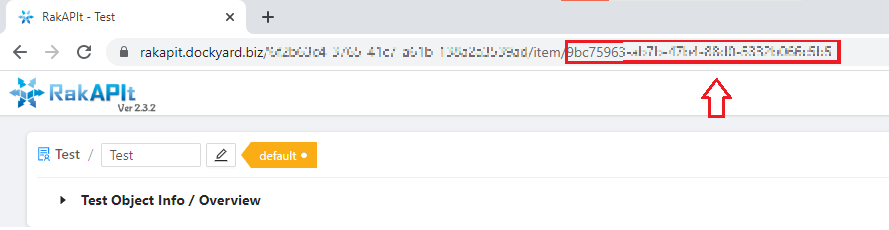
Get TestObjectId -
runTestCase: object
※ Specify the test cases here. There are four ways to specify test cases.
-
When specifying Test Suite Id:
runTestCase.testSuiteIdList: integer array
Example: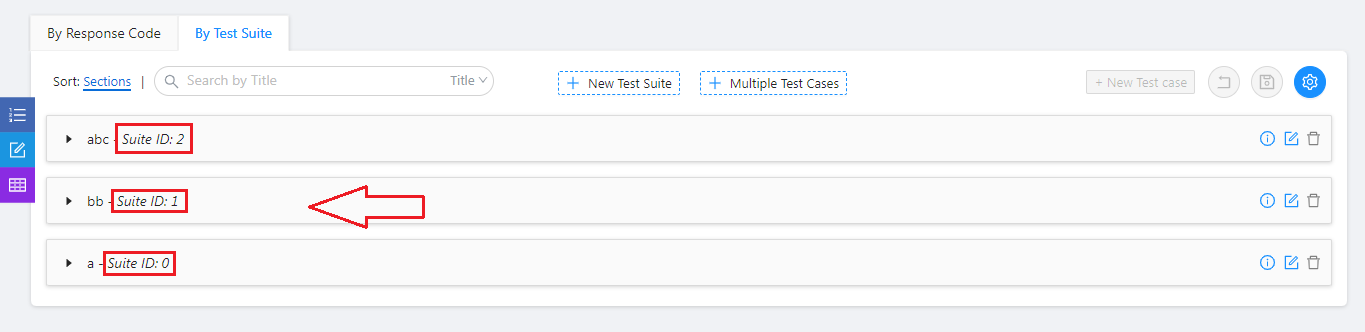
Get SuiteId
{ "projectId": "xxxxxxxxxxxxxxx", "testObjectId": "xxxxxxxxxxxxx", "runTestCase": { "testSuiteIdList": [ 0, 1 ] } } -
When specifying Test Case Id:
runTestCase.testCaseIdList: integer array
Example: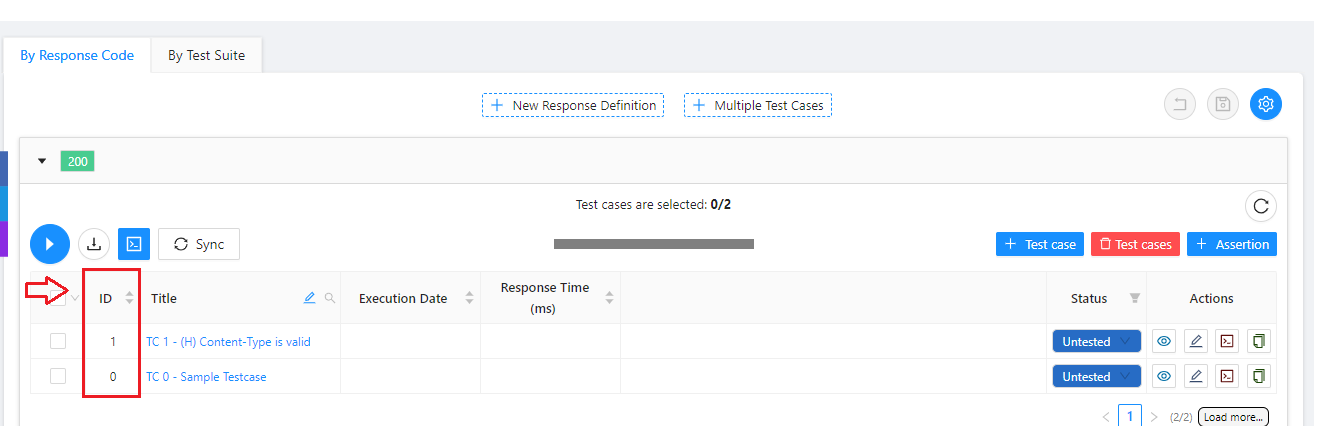
Get TestCaseId
{ "projectId": "xxxxxxxxxxxxxxx", "testObjectId": "xxxxxxxxxxxxx", "runTestCase": { "testCaseIdList": [ 0, 1 ] } } -
When specifying Response Code:
runTestCase.responseCodeList: integer array
Example: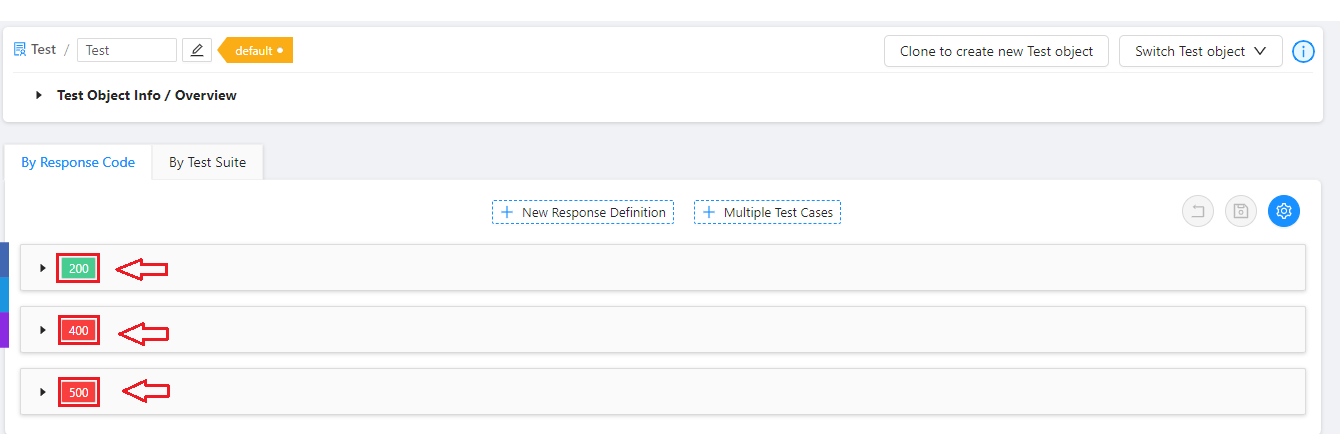
Get Response Code
{ "projectId": "xxxxxxxxxxxxxxx", "testObjectId": "xxxxxxxxxxxxx", "runTestCase": { "responseCodeList": [ 200, 400 ] } } -
When specifying a range:
runTestCase.from: integer
runTestCase.to: integer
Example:
{
  "projectId": "xxxxxxxxxxxxxxx",
  "testObjectId": "xxxxxxxxxxxxx",
  "runTestCase": {
    "from": 1,
    "to": 50
  }
}
-
When specifying Test Suite Id:
-
projectId: string
RESPONSE
-
When the test cases are being executed normally
Status: Success - Status Code: 200
Example:
{ "status": "Success", "detail": "Start running Test case(s). Please wait a few minutes!", "requestId": [requestId] } -
When another test cases are being executed in the same Test Object
Status: Failed - Status Code: 400
Example:
{ "status": "Failed", "detail": "There are some Test cases running in this Test Object. Please wait for it to finish then get data again." } -
When the test cases cannot be executed for some reason
Status: Failed - Status Code: 400/500
Example:
{
  "status": "Failed",
  "detail": [error detail]
}
API Get Execution Results
You can use the API to get the result of the test cases you requested. The prerequisite for that is the requestId returned by the test cases execution API.
-
Test Case Result
REQUEST
- Method: GET
- Endpoint: https://rakapit-run-api.dockyard.biz?requestId={requestId}
-
Header:
- Content-Type: application/json
-
Authorization: [Access Token]
※You can get Access Token in「CI/CD Setting - Access Token」-「My profile」
-
URL param:
-
requestId: string
※ The requestId can be found in the Response returned by the test cases execution API.
-
requestId: string
RESPONSE
-
Successful run case
Status: Finish - Status Code: 200
Example:
{ "status": "Finish", "detail": "Get data successfully!", "data": [data] } -
Case in which test cases are being executed
Status: Running - Status Code: 419
Example:
{ "status": "Running", "detail": "There are some Test cases running in this Test Object. Please wait for it to finish then get data again." } -
Case TimeOut
The maximum processing time for a request is 45 minutes. If the processing time is exceeded, test cases execution will be interrupted and some of the test cases will not be executed. After checking the results, proceed with the additional execution.
Status: TimeOut - Status Code: 200
Example:
{ "status": "TimeOut", "detail": "Some test cases are not executed.", "data": [data] } -
When a test cases execution is not completed for some reason
Status: Failed - Status Code: 400/432
Example:
      {
        "status": "Failed",
        "detail": [error detail]
      }
Generate Access Token
Get Access Token by:
- Press My profile to display CI/CD Setting - Access Token in Profile drawer
- Press the "Generate Token" button to generate a Token
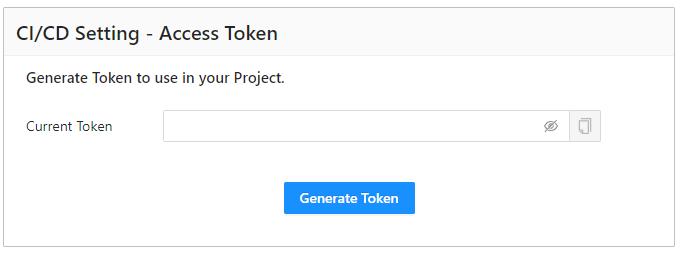
Generate Access Token